


Claude Not Working? Here’s What to Check First
Claude can open normally and still fail when you try to use it.
Maybe a prompt stays stuck, Claude returns an error, the login page won’t work, or a long conversation suddenly stops responding.
Before clearing browser data, reinstalling the app, or changing several settings at once, first figure out what kind of problem you’re actually dealing with.
A quick comparison between Claude, your browser, your account, and another device can often tell you where to look next.
First, What Exactly Is Going Wrong?
Start with the symptom.
Are you seeing:
- Claude not loading at all
- A login or authentication error
- A prompt that won’t send
- A response that gets stuck
- A long conversation that suddenly stops
- A usage-limit message
- Claude working on one device but not another
These are not necessarily the same problem.
For example, if Claude works in a new conversation but not in one very long chat, the service itself may be working normally. If it fails across browsers and devices, a local browser problem becomes much less likely.
The Fastest Test
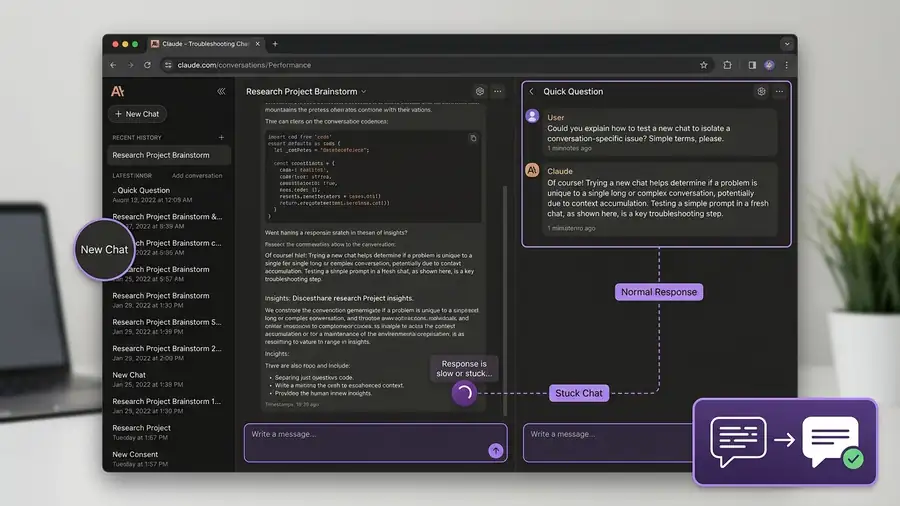
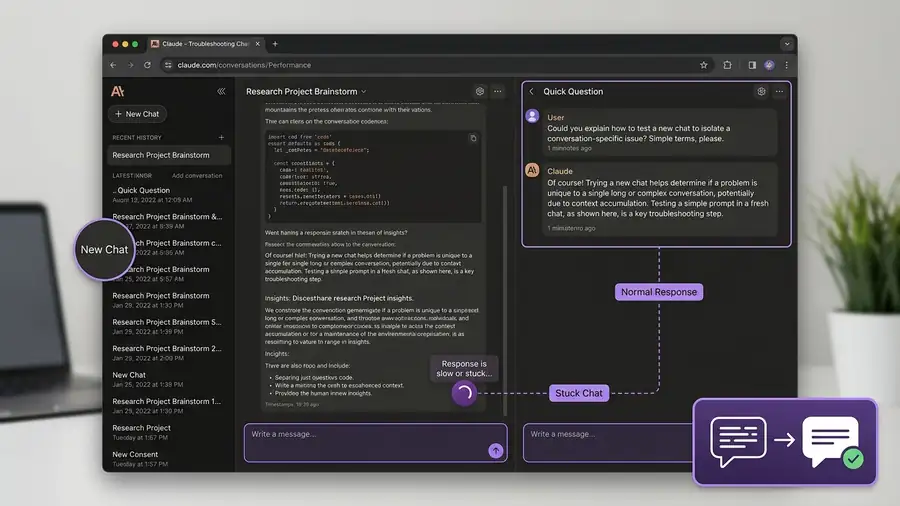
Before changing browser settings, try the same simple prompt in a new Claude conversation.
If it works there, the problem is likely limited to the original chat.
If it still fails, test Claude in a private browser window or on another device.
This gives you a useful clue before you start changing settings that may not be causing the problem.
Is Claude Down, or Is It Just You?
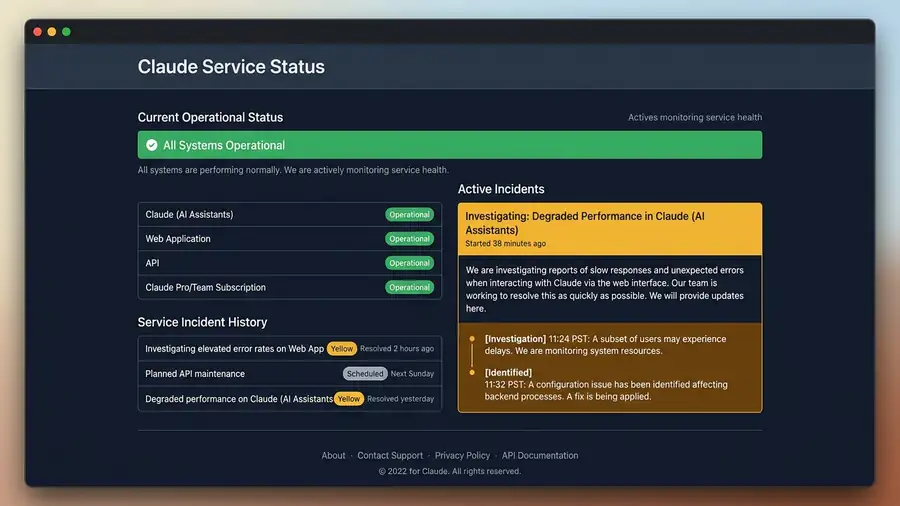
Before changing anything, check the official Claude status page.
If Anthropic reports a service incident affecting Claude, there may be nothing wrong with your device. In that situation, repeatedly clearing cookies or reinstalling Claude won’t fix the underlying problem. Anthropic uses its status page to report confirmed service incidents and major disruptions. (status.claude.com)
There’s another situation that’s easy to confuse with an outage: capacity constraints.
Anthropic says capacity constraints happen when Claude is handling unusually high demand. You may see a message saying Claude cannot respond because of unexpected capacity constraints. These are different from outages and may not appear on the status page. Anthropic recommends trying again later when this happens. (support.claude.com)
That distinction matters:
Service incident → Claude may be broadly unavailable.
Capacity constraint → Claude is managing demand and may recover shortly.
Claude Won’t Let You Log In
If the problem happens before you can even reach your chats, focus on the login process rather than troubleshooting Claude’s responses.
Claude currently offers login with Google or through an email login link. If you’re using email login and the message doesn’t arrive, check your spam or junk folder for mail from @mail.anthropic.com. (support.claude.com)
If the login link arrives but authentication still fails:
- Try again after a few minutes.
- Open Claude in another browser.
- Temporarily disable browser extensions.
- Turn off a VPN.
- Check the Claude status page.
Anthropic specifically lists VPNs, browser extensions, and cached browser data among possible causes of login errors. (support.claude.com)
If Claude works in another browser, you’ve learned something useful: the problem is more likely related to your original browser, an extension, or cached site data than to your Claude account.
Claude Opens, but Your Prompt Won’t Send
If the website loads normally but pressing Send does nothing, test something very simple.
Start a new conversation and send a short prompt such as:
What is 2 + 2?
If the simple prompt works, the problem may be related to the original conversation, its length, or the content being processed.
If even a simple new prompt fails, compare Claude in another browser or on another device before changing local settings.
This gives you a much better clue than repeatedly refreshing the same page.
Try a New Conversation
A long Claude conversation can behave differently from a new chat.
Anthropic distinguishes between usage limits and length limits. Usage limits control how much you can use Claude over a period of time, while length limits relate to how much information a single conversation can handle. (support.claude.com)
So if one large conversation stops responding but a new chat works normally, don’t immediately assume Claude is down.
Create a new conversation and test the same general request.
If the new chat works, continue there rather than repeatedly trying to revive the old one.
Is It a Usage Limit?
Claude also has usage limits that vary by plan and can be affected by factors such as message length, conversation length, model choice, tools, files, and effort level. (support.claude.com)
This can create a confusing situation:
Claude works normally → you use it heavily → requests suddenly stop or are limited.
That does not necessarily mean Claude is broken.
Check the message Claude gives you. If it clearly indicates that you’ve reached a usage limit, waiting for the reset is more appropriate than changing browser settings.
Also remember that Claude’s web, desktop, and mobile products can count toward the same usage limit. (support.claude.com)
Check Your Browser Before Resetting Anything
If Claude works elsewhere but not in your normal browser, investigate the browser first.
Open Claude in an Incognito or Private window.
Then compare the result.
If Claude works in Private mode
Your normal browser session becomes the stronger suspect.
Possible causes include:
- A browser extension
- Cached site data
- Cookies
- Privacy or security software
Anthropic specifically recommends disabling extensions and clearing browser cache/cookies when troubleshooting login errors. (support.claude.com)
Start by disabling extensions one at a time rather than removing everything.
Test the Network
If Claude fails in your normal browser and private browsing, compare networks.
For example:
Wi-Fi → mobile hotspot
If Claude works on the hotspot but not your normal Wi-Fi, you’ve narrowed the problem down to the network rather than Claude itself.
A VPN can also interfere with access in some situations. Anthropic specifically recommends disabling a VPN when troubleshooting certain Claude login problems. (support.claude.com)
Don’t reset all your network settings unless simpler tests point in that direction.
Compare Web, Desktop, and Mobile
Claude is available on the web, desktop, and mobile. (support.claude.com)
Use that to your advantage.
Try the same account in another version of Claude.
If web fails but mobile works
The issue may be related to your browser or computer.
If mobile and web both fail
Check your account, usage status, and Claude’s service status.
If Claude fails everywhere
A service-side issue, account issue, or usage restriction becomes more likely.
This simple comparison can save you from troubleshooting the wrong device.
When a Long Conversation Is the Problem
If Claude stops responding during a very long chat, don’t immediately reinstall anything.
First, start a new conversation.
Anthropic explains that longer conversations can consume more of your available usage and may eventually run into conversation-length limits. Starting a new conversation can be an appropriate way to continue when a chat has become too large. (support.claude.com)
If the new chat works normally, you’ve already learned something important about the original conversation.
Quick Diagnosis
| What you’re seeing | What it most likely points to |
|---|---|
| Claude fails on every device | Service, account, or usage issue |
| Status page shows an incident | Claude-side problem |
| Capacity warning appears | Temporary high-demand condition |
| Login email never arrives | Email delivery or account issue |
| Works in another browser | Browser or extension problem |
| Works in Private mode | Extension or browser-data issue |
| Works on mobile data but not Wi-Fi | Network or VPN issue |
| New chat works | Original conversation may be the problem |
| Usage-limit message appears | Account usage limit |
| Long chat fails but new chats work | Conversation length/context issue |
More AI Troubleshooting Guides
Having another AI or browser-related problem? These troubleshooting guides may also help:
- Google Gemini Not Working? Here’s What to Check First
- ChatGPT Not Loading? How to Tell If It’s Down
- Google Search Not Working? What to Check First
FAQ
Why is Claude not working?
The problem could be a Claude service issue, capacity constraint, login problem, usage limit, long conversation, browser extension, VPN, or network problem. Start by identifying which symptom you’re seeing.
Why does Claude work in a new chat but not my old conversation?
If the new chat works while the old one does not, the issue may be related to the length or complexity of the original conversation rather than a Claude-wide outage.
Why won’t Claude let me log in?
Check your login email, spam folder, browser extensions, VPN, and the Claude status page. Anthropic specifically recommends checking these areas for login errors. (support.claude.com)
Does Claude have usage limits?
Yes. Anthropic says usage limits vary by plan and can be affected by conversation length, message length, model choice, tools, files, and effort level. (support.claude.com)
Final Thoughts
When Claude isn’t working, don’t start by changing everything.
First ask a simpler question:
Where does Claude actually fail?
If it fails everywhere, check Claude’s status and your usage information. If it works in another browser, investigate extensions or browser data. If a new conversation works, the original chat may be the problem. And if it works on another network or device, focus your troubleshooting there.
The fastest fix is often not another setting.
It’s finding the right place to look first.