

iPhone Contacts Search Not Working? Why Names Don’t Appear
You know a contact is saved on your iPhone, but searching for their name returns no results. Sometimes the person appears in your contact list but disappears when you use the search bar. In other cases, Contacts takes several seconds to show matching names.
If iPhone contacts search is not working, the cause may be a selected contact list, an account syncing issue, or a temporary iOS problem. Before changing settings or risking your saved data, identify which type of problem you’re experiencing.
1. Why Does Your iPhone Show a Contact but Not Find It?
Start by checking what actually happens:
| What you notice | What to investigate |
|---|---|
| Contact appears in the list but not search | Search or indexing issue |
| Contact is missing from the list too | Contact account or sync |
| Only some contacts appear | Selected list or account |
| Spotlight can’t find names | System search settings |
| Results appear after waiting | Temporary delay |
This distinction matters because a missing contact and a contact that search cannot find are not necessarily the same problem.
2. Search All Contacts Instead of One Account
Your iPhone can display contacts from iCloud, Gmail, and other accounts. If you’re viewing only one list, contacts saved elsewhere may not appear.
Try this first:
- Open the Contacts app.
- Tap Lists in the upper-left corner.
- Select All Contacts, if available.
- Search for the missing person’s name again.
If you use iCloud, Apple recommends checking All iCloud and then individual account lists when a contact is missing. You can also swipe down on the contact list to refresh it.
If the name appears after selecting another list, you’ve found an account-selection issue rather than a missing contact.
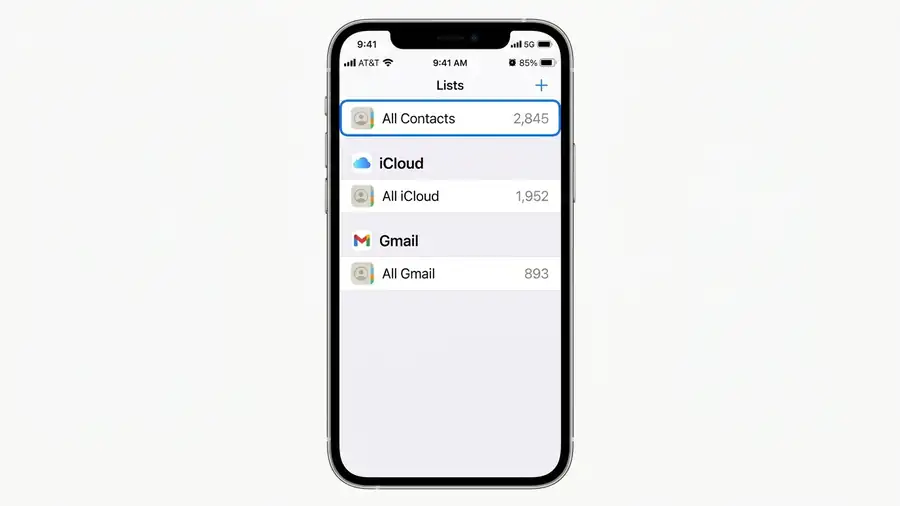
3. Check Whether the Contact Is Stored in iCloud or Gmail
If the contact doesn’t appear in any list, check the account where it may have been saved.
For iCloud:
- Open Contacts and tap Lists.
- Select All iCloud.
- Look for the missing contact.
- If necessary, check iCloud.com/contacts using your Apple Account.
For Gmail:
Open Google Contacts and sign in with the Google account you use on your iPhone.
If the contact exists online but not on your iPhone, check its syncing settings. Go to Settings > Apps > Contacts > Contacts Accounts, select the relevant account, and make sure Contacts is enabled.
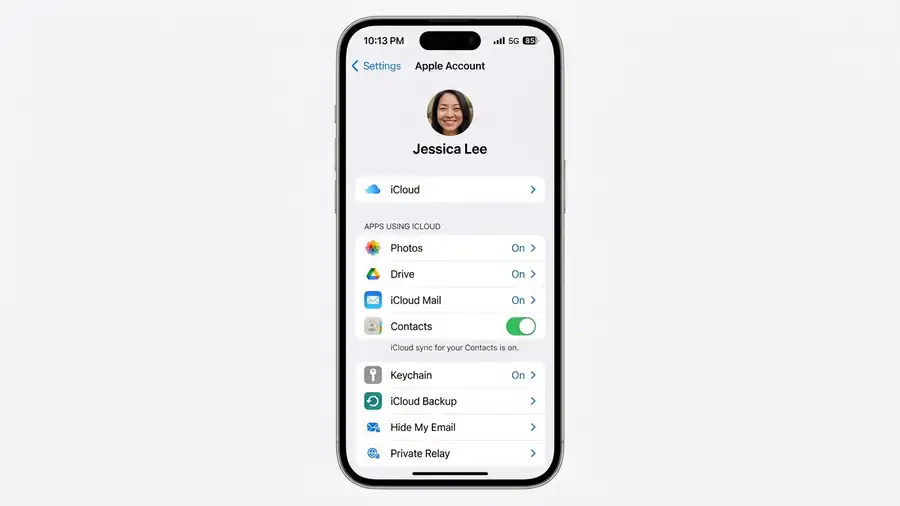
Don’t remove an account or turn off syncing before confirming that your contacts are safely stored.
4. Contacts Search Works, but Spotlight Doesn’t
The Contacts app search and iPhone Spotlight search are two different ways to find information.
If you can find a person inside Contacts but not from the Home Screen:
- Open Settings.
- Find Search.
- Check the available search options for Contacts.
- Make sure Contacts is allowed to appear in search results, if that option is available.
Then return to the Home Screen and test the search again.
If the contact is missing from both searches, continue with the account and refresh checks instead.
5. Did Contacts Search Stop Working After an iOS Update?
If the problem started after updating iOS, try refreshing the app before making bigger changes.
- Close Contacts, return to the Home Screen, wait briefly, and reopen it.
- Open Contacts and swipe down on the list to refresh.
- Restart your iPhone.
- Check Settings > General > Software Update for an available update.
These steps can help with temporary app or syncing problems, but they don’t prove that an iOS update caused a general Contacts search bug.
For additional guidance, see Apple’s official article: If your iCloud Contacts won’t sync.
6. What Not to Do When Contacts Search Returns No Results
Avoid deleting contact accounts, disabling iCloud Contacts, or resetting your iPhone as your first troubleshooting step.
Before making account changes, confirm that your contacts are available through iCloud or Google Contacts. This helps prevent accidental data loss while investigating the search problem.
If contacts remain unavailable across your device and online account, contact Apple Support for help recovering or restoring them.
Frequently Asked Questions
Why is my iPhone contacts search not finding saved names?
Check whether you’re searching All Contacts or only one account. If the contact is visible in the list but not in search, refresh Contacts and restart your iPhone.
Why does Spotlight not find my iPhone contacts?
Check whether Contacts is included in your iPhone’s Search settings. Also test the same name directly inside the Contacts app.
Can an iOS update cause Contacts search problems?
A software update may coincide with temporary search or syncing issues, but not every case indicates a confirmed iOS bug. Check Apple’s support guidance and available updates.
Can I recover contacts that disappeared from my iPhone?
Check iCloud.com or Google Contacts first. If the contacts are stored in your account, you can investigate syncing without immediately resetting your device.
More iPhone Guides
- iOS 27 Problems: Common Issues and What to Check
- iCloud Photos Not Syncing?
- FaceTime Not Working on iPhone?